Announcement

Collapse
No announcement yet.

SOUNDBAR HELP PLEASE

Collapse
X
 
  • Filter
  • Time
  • Show
Clear All
new posts

  • #16
    Re: SOUNDBAR HELP PLEASE

    Originally posted by Moodybluebird View Post
    On the Virgin box there are 3 spare Ethernet (?) ports (yellow) and 1 spare Tel input.

    On the back of the soundbar there are no HDMI inputs. There is a co-axial input, an optical input and a small audio input.
    Is it a JVC tv? I'm thinking marry up the tv and the sound bar first without the Virgin box plugged in (use tv aerial input)...select "antenna" from input options. Check sounds bar works. Keep the tv on. Unplug the aerial. On input options select "cable" or might be Virgin box as an option. Plug in the Virgin box, turn on Virgin box. That might trick the tv/soundbar into picking up the sound off the Virgin box. If not....try each audio input option on settings in turn. The option to plug the soundbar into the Virgin box direct.....not sure about that. Doesn't sound like the wiring option is a goer. Good luck.

    Comment


    • #17
      Re: SOUNDBAR HELP PLEASE

      Originally posted by IanD View Post
      Is it a JVC tv? I'm thinking marry up the tv and the sound bar first without the Virgin box plugged in (use tv aerial input)...select "antenna" from input options. Check sounds bar works. Keep the tv on. Unplug the aerial. On input options select "cable" or might be Virgin box as an option. Plug in the Virgin box, turn on Virgin box. That might trick the tv/soundbar into picking up the sound off the Virgin box. If not....try each audio input option on settings in turn. The option to plug the soundbar into the Virgin box direct.....not sure about that. Doesn't sound like the wiring option is a goer. Good luck.
      Cheers for that Ian. If all else fails I'll try to find a sound engineer on the cheap !

      Comment


      • #18
        Re: SOUNDBAR HELP PLEASE

        In settings on the virgin box go to sound and then it's something like output. There should be two options with one being PCM. Choose the other output setting that isn't ticked and try again. It can sometimes be the output isn't recognised by the soundbar.

        Failing that take a pic of the inputs on the soundbar and the output/input on the tv and put it on here. I'll have a look later on and see if there is something we are missing.

        Comment


        • #19
          Re: SOUNDBAR HELP PLEASE

          Originally posted by Moodybluebird View Post
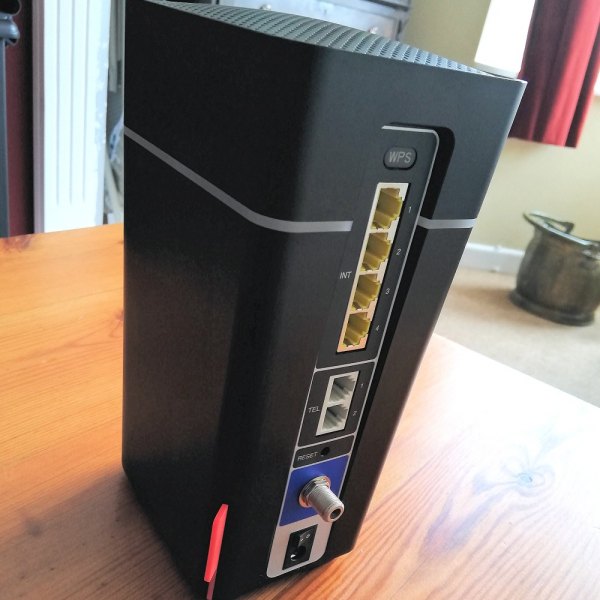
          On the Virgin box there are 3 spare Ethernet (?) ports (yellow) and 1 spare Tel input.

          On the back of the soundbar there are no HDMI inputs. There is a co-axial input, an optical input and a small audio input.
          How is the TV connected to the soundbar now? If you unplug the TV end of that cable, can you plug it into the Virgin Box directly? Does that give anything out of the soundbar? If not, try changing the Virgin box sound settings as suggested by Maccy Blue.
          If it does work like this, then next step to try and get it working would be Virgin box -> TV -> soundbar.

          Comment


          • #20
            Re: SOUNDBAR HELP PLEASE

            Maccy Blue and bigjoe

            I went to the video/audio settings for the Virgin box but couldn't find anything related to PCM.

            There is a cable from the soundbar to the TV. The TV input is marked Digital Audio Output (Optical) and the soundbar input is labelled TV optical. The fittings on this cable will not go into the Virgin box.

            As I said earlier the soundbar works when I have the Humax channel on. But if I take the TV aerial out of the Humax box, plug it straight into the TV and put on Virgin, the white light starts flashing on the front of the soundbar, which in effect means it's not working.

            Comment


            • #21
              Re: SOUNDBAR HELP PLEASE

              Trying to read through the thread I can't see how you have the sound bar joined to the virgin tv box.

              Connecting the soundbar to the tv directly will not get sound from virgin tv.

              How does the virgin box connect to the tv?

              What model of virgin box do you have and what model of soundbar?

              Usually (if not using bluetooth) soundbar should connect to virgin box, which then connects to the tv to produce a chain connecting all three devices.

              Also on the soundbar there are different inputs, i have a JVC soundbar and you have to change the input depending if you are getting sound via auxillary, or bluetooth, or optical etc.

              The flashing white light when you unplug the humax is probably just telling you the connection has been lost on that input.

              Also a firestick wont just work with the soundbar, it has to be paired via bluetooth

              Comment


              • #22
                Re: SOUNDBAR HELP PLEASE

                Originally posted by Michael Morris View Post
                Trying to read through the thread I can't see how you have the sound bar joined to the virgin tv box.

                Connecting the soundbar to the tv directly will not get sound from virgin tv.

                How does the virgin box connect to the tv?

                What model of virgin box do you have and what model of soundbar?

                Usually (if not using bluetooth) soundbar should connect to virgin box, which then connects to the tv to produce a chain connecting all three devices.

                Also on the soundbar there are different inputs, i have a JVC soundbar and you have to change the input depending if you are getting sound via auxillary, or bluetooth, or optical etc.

                The flashing white light when you unplug the humax is probably just telling you the connection has been lost on that input.

                Also a firestick wont just work with the soundbar, it has to be paired via bluetooth
                Mike, I'll check out the points you raised and come back to you later. Many thanks.

                Comment


                • #23
                  Re: SOUNDBAR HELP PLEASE

                  Also the virgin box you mention sounds like a router not a TV box. The latest Virgin TV box has hdmi, coax, audio, usb connections. It should only have one yellow connection from where it receives the internet connection from the router.

                  The back of the TV box should look like this. Where you should be able to connect the optical cable from D.AUDIO to the optical input on the soundbar. Then change the input setting on the soundbar remote control or by changing input by pusjing a button on the soundbar.


                  What you describe is a router which looks something like the picture below. There should be a cable from one of the yellow ports to the separate virgin TV box going into the yellow connection you see on the first image.

                  Comment


                  • #24
                    Re: SOUNDBAR HELP PLEASE

                    Originally posted by Michael Morris View Post
                    Also the virgin box you mention sounds like a router not a TV box. The latest Virgin TV box has hdmi, coax, audio, usb connections. It should only have one yellow connection from where it receives the internet connection from the router.

                    The back of the TV box should look like this. Where you should be able to connect the optical cable from D.AUDIO to the optical input on the soundbar. Then change the input setting on the soundbar remote control or by changing input by pusjing a button on the soundbar.


                    What you describe is a router which looks something like the picture below. There should be a cable from one of the yellow ports to the separate virgin TV box going into the yellow connection you see on the first image.

                    Yep spot on Mike, I'm even more technically inept than I first thought, it is a router ! I'll have a good look at the V360 box later and see if I can make the changes to the set-up you suggest. 👍

                    Comment


                    • #25
                      Re: SOUNDBAR HELP PLEASE

                      just as a matter of interest - I tried to post already something with the picture of the back of the virgin box. Do I have the rights to do this?

                      Comment


                      • #26
                        Re: SOUNDBAR HELP PLEASE

                        Originally posted by bigjoe View Post
                        just as a matter of interest - I tried to post already something with the picture of the back of the virgin box. Do I have the rights to do this?
                        In principle you have the rights to do this.

                        But the picture upload system doesn’t always work. What I tend to do if the upload is not working, is to tight click on image online and copy the address and then instead of uploading a photo insert it from URL but you need to untick the little box underneath where are you put the address in

                        Comment


                        • #27
                          Re: SOUNDBAR HELP PLEASE

                          Originally posted by Michael Morris View Post
                          Also the virgin box you mention sounds like a router not a TV box. The latest Virgin TV box has hdmi, coax, audio, usb connections. It should only have one yellow connection from where it receives the internet connection from the router.

                          The back of the TV box should look like this. Where you should be able to connect the optical cable from D.AUDIO to the optical input on the soundbar. Then change the input setting on the soundbar remote control or by changing input by pusjing a button on the soundbar.


                          What you describe is a router which looks something like the picture below. There should be a cable from one of the yellow ports to the separate virgin TV box going into the yellow connection you see on the first image.

                          Mike, I've now put the optical cable from the soundbar to the D Audio input on the back of the Virgin box. Can't find anything to press on the JVC TH-227B soundbar other than source (also EQ, Vol etc), same with remote.
                          So soundbar not working.

                          The current set up is this:
                          Cable from Virgin internal wall box to a chrome 3 socket connector.
                          Cable from that connector to the Coax In at the back of the Virgin box.
                          Another cable from that connector to an input near the base of the router.

                          An HDMI cable from the back of the TV to the back of the Virgin box

                          An HDMI cable from the back of the TV to the Humax.

                          Hope this helps.

                          Comment


                          • #28
                            Re: SOUNDBAR HELP PLEASE

                            have the virgin tv playing something and and with the soundbar on and volume up (even if you can't hear it) change the source on the sound bar

                            click it and wait for a moment , and then click it again,

                            the light usually changes colour, blue is when it's on the bluetooth connection, white on optical, orange on coaxial and green on aux

                            so you need the white light to be on.

                            Comment


                            • #29
                              Re: SOUNDBAR HELP PLEASE

                              One other thing I've seen before is that if the digital audio cable is not fitted in correctly it won't work. It has a specific shape so it has to be in the right orientation and it will click in slightly. So make sure it's lined up and clicked in with a little bit of pressure

                              Comment


                              • #30
                                Re: SOUNDBAR HELP PLEASE

                                if happy the cable is fitted, the input is showing a white light and the volume on the soundbar is up and it's still not working go back into the audio settings on the virgin tv box and change between dolby and pcm settings.

                                In the meanwhile are you getting volume from the TV speakers when watching virgin?

                                Comment

                                Working...
                                X